

A BusinessObjects expert in your inbox. Biclever Agent is an AI colleague with its own email address. Your team writes to it the way they would write to a consultant: “Create a report of registered hours per employee for January to May”. When the task is complete, the agent replies with a summary of what it built, where it saved it, and any outstanding issues.
No software to install, no portal to learn, no training. If your people can send an email, they can use it.
Why teams use it
- No more waiting days for small jobs. “Add a column”, “what does this field mean?”, “why do these two reports disagree?” Requests like these used to queue for a consultant and cost billable hours. The agent picks them up straight away.
- It does the work as well as giving advice. The agent doesn’t stop at telling you how to build the report. It builds or changes it in your BusinessObjects system and tells you where to find it.
- It knows your setup. A general-purpose chatbot doesn’t know your folders, your universes, your naming conventions or the quirks of your installation. Your agent does, and it learns more with every task.
- Built on real consulting experience. The agent works from our curated knowledge base and a library of tested BusinessObjects tools that we use every day in our own consulting work. This gives it practical BusinessObjects capabilities beyond those of a general-purpose chatbot.
What you can ask it
- Build new reports from a short description or an attached specification: queries, variables, tables, prompts, filters and formatting.
- Change existing reports. “Add Year and Month prompts to that report.” “Now add a total row.”
- Answer questions about your system: what a field means, which universe to use, why a number differs between two reports.
- Analyse and check reports: find unused objects, compare two versions of a document, or check that reports still run after an upgrade or migration.
- Look at the data to verify a result or answer a factual question.
- Apply changes across reports. Once you are happy with a change or analysis in one report, ask the agent to apply the same approach to other reports.
How it works for your team
- Send a request by email, in plain language. Attach a specification or an example if it helps.
- Get the reply, often within 5 to 20 minutes, depending on the complexity of the task. It lists every report created or changed, with system, folder, name and ID, whether it was saved, and anything left open.
- Reply on the same thread to continue. The agent keeps the context, so follow-ups like “make the dates monthly” just work.
- Clarify when needed. If the agent identifies an ambiguity, it may ask a follow-up question and suggest options found in your system.
To start a new topic, send a new email.
Note: AI can make mistakes. Important changes and results may require human review before they can be relied upon in production.
Safe by design
- The AI never sees your passwords. Credentials are held by a separate gatekeeper component that logs in on the agent’s behalf. Each task gets its own fresh session.
- Safeguards for original reports. By default, the agent works on a copy. If you explicitly request a change to the original, it makes a backup first.
- Only your people can use it. You decide who may write to the agent. Mail from anyone else, or from a sender address that can’t be verified, is ignored.
- Your data stays yours. Each customer has a dedicated agent with its own mailbox, memory and system access, running in an isolated workspace.
- Everything is traceable. Every system call is logged and every task is recorded in the agent’s journal, so past work can be found, reviewed and repeated.
- You set the limits. The agent uses a service account with exactly the rights you choose. We recommend starting on development or test environments.
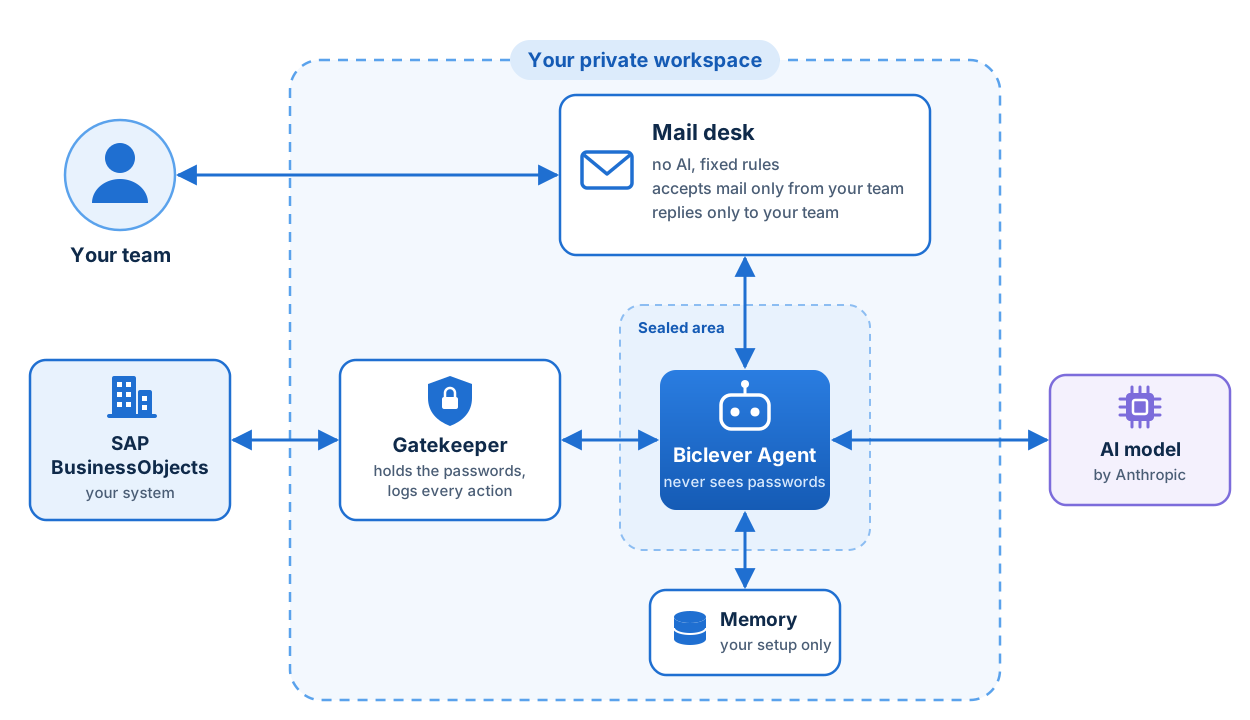
An agent that keeps getting better
Your agent keeps a notebook about your systems, your preferences and the work it has done, just like a consultant who has been on your project for months.
Getting started
- Agree the scope. Which systems and environments the agent may work on, and who may write to it.
- Connect your system. You provide a dedicated service account with the rights you’re comfortable granting.
- Prepare the agent’s knowledge. We set up its memory with your folders, conventions and key reports, so it knows your environment from day one.
- Trial. A few of your users send real requests while we watch closely and tune the agent.
- Go live. Your users get the address and one rule: write to it like a colleague.
Adding or removing a user later takes one email to us.
Talk to us
We’re onboarding our first customers now. If your team spends too much time waiting on BusinessObjects work, let’s talk about what the agent could take off your plate.

