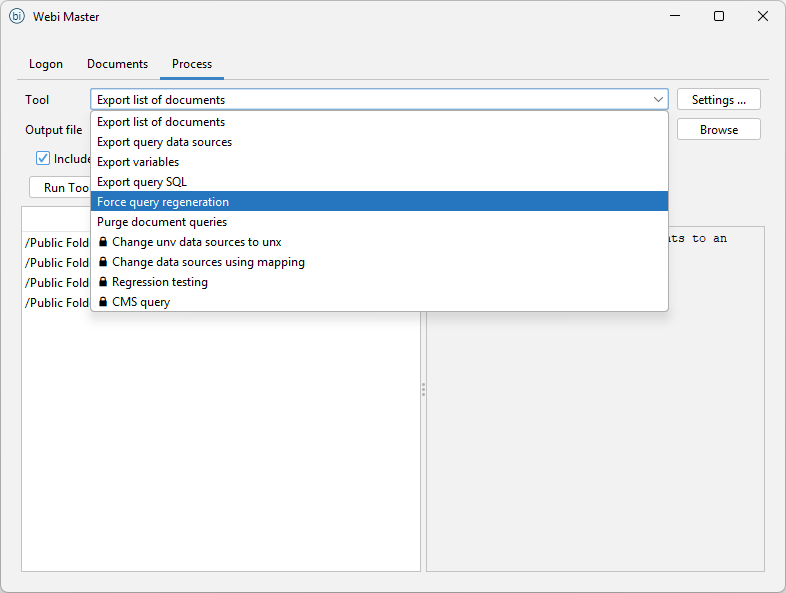
Built on the BIP REST API — no SAP SDK or server-side install required. Webi Master talks to your BO platform over HTTPS, so it runs on any workstation with BO Client Tools and a network route to the BIP server.
Features
-
Data Provider List Export: Exports a list of documents along with their universes. Unlike the CMC’s “Check Relationships” feature, this tool opens documents and checks actual universes, providing more accurate results and identifying broken dependencies (e.g., missing universes).
-
UNV to UNX Conversion: Automatic remapping of documents from UNV universes to UNX universes. UNV universes are deprecated. The feature allows you quickly migrate your reports to UNX universes. (Check instructions in the tool for the suggested use)
-
Data Source Remapping: Remaps documents using a specified mapping.
-
Regression Testing: Allows you to run export report prompts, and then run reports with specified values. This feature is useful to ensure that changes do not negatively impact existing functionalities.
-
Document Purging: Cleans up saved prompt values.
-
Force Query Regeneration: Regenerates all queries in selected documents (custom queries are not regenerated).
-
CMS Query Execution: Runs CMS queries without requiring server client tools.
-
Unused Object Analysis: Identifies universe objects (dimensions, measures, filters) that are not referenced by any report. Useful for universe cleanup, simplification before a migration, and reducing the surface area exposed to end users.
-
Dependencies Export: For every selected document, lists the universe objects it uses. Before you rename, retype, or retire an object, this tells you which reports will break — turning impact analysis into a one-click report instead of opening reports one by one.
-
Variables Export: Pulls every user-defined variable and formula across selected documents into a single sheet. Useful for spotting duplicated calculations, standardising on a canonical version, and identifying formulas that should be promoted into the universe.
-
Data Provider SQL Export: Extracts the actual SQL each query generates — including hand-edited free-hand SQL. Lets a DBA review performance and security without needing access to the BO server, and gives developers a quick way to grep across the SQL of an entire estate.
-
Document List Export: BO doesn’t make it easy to get a flat list of reports with their metadata — owners, modification dates, refresh-on-open flags. This export does it in one click, saving the back-and-forth of building lists by hand.
Information
Downloads
Without a PRO license the tool runs in a limited test mode so you can evaluate it; full automation and bulk operations require a PRO license.
Support
Screenshots