

This is a real email thread between a user and Biclever Agent on a demo SAP BusinessObjects system, sent on 10 October 2026. The whole conversation took about 40 minutes. The screenshots show the report after each reply.
1. Describe the report
Dmytro, 09:39
Could you describe the report called Sales Report?
Biclever Agent, 09:42
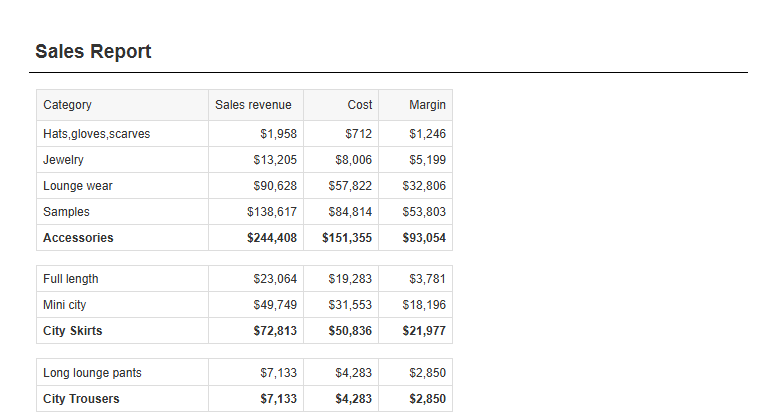
Sales Report (demo system, Public Folders › Demo, id 28938) is a Web Intelligence document with a single report tab, “Report 2”. It shows sales revenue, cost and margin for each product line and category of the eFashion universe, for one year.
Data
- One query, “Query 2”, on the eFashion universe (Universes › Samples).
- It returns Lines, Category, Sales revenue and Margin.
- A mandatory Year: prompt filters the query to one year. It takes a single value (2014–2019), and 2019 was the last answer.
- One document variable: Cost = [Sales revenue] - [Margin].
- The document refreshes on open and is saved without data. The last refresh was 9 Oct 2026 at 23:45.
Layout
- A title cell at the top of the page: “Sales Report”.
- One table with the columns Category, Sales revenue, Cost and Margin. All amounts use the currency format $#,##0, with negative values in red.
- The table is broken on Lines: one block per product line, sorted and foldable. The Lines column itself is hidden.
- After each line comes a subtotal row with the line name and its revenue, cost and margin.
- The table ends with a grand-total row.
- There are no input controls, report filters, conditional formatting or merged dimensions, and every object in the query is used.
Problems I noticed
- The grand-total row has two values in the wrong columns. The Sales revenue column shows the total cost, and the Cost column shows the total sales revenue. The subtotal rows are correct.
- The grand-total row says “Total” twice, under the hidden Lines column and under Category.
- The Cost and Margin columns are very narrow and set to auto-fit. Their headers are also styled differently from the other columns.
- The table header doesn’t repeat on each page, which matters if the table runs past one page.
- The tab is still called “Report 2”.
Documents touched: none. I only read Sales Report (id 28938) and did not change or save it. I also didn’t run the query, so I can’t tell you any figures.
I can fix points 1–5 on a draft copy, “Sales Report (draft)” in the same folder, and leave the original untouched. Or I can make the fixes directly in the original after taking a backup. Just tell me which you prefer.
2. Fix the report and add KPIs
Dmytro, 09:46
Could you please fix the issues directly in the report?
Please add a GM% calculation. Highlight values below 20% in red and values above 45% in green.
Add four KPIs at the top with the totals: Revenue, Cost, GM and GM%.
Biclever Agent, 09:55
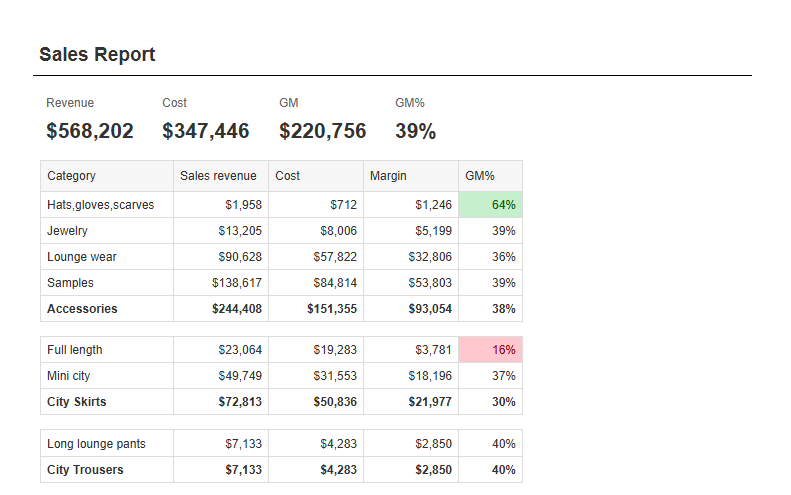
I fixed the five issues directly in Sales Report and added the GM% column, its colour rules and the four KPIs. It’s saved, and I checked it from a fresh session. I backed up the original first.
Fixes to the existing report
- Grand total corrected: the Sales revenue and Cost totals are now in the right columns. The figures now add up: revenue $568,202 minus margin $220,756 is cost $347,446.
- Single “Total” label: only one “Total” remains on the grand-total row.
- Column widths and headers: Sales revenue, Cost and Margin now have the same fixed width, and their headers are styled the same. I also narrowed Category slightly so the table fits on an A4 portrait page.
- Repeating header: the table header now repeats on every page.
- Tab name: the tab is now called “Sales Report” instead of “Report 2”.
New content
- GM% = Margin ÷ Sales revenue, shown as a whole percentage (e.g. 39%). If a row has no revenue, the cell stays empty instead of showing an error.
- GM% column at the right end of the table. The product-line subtotals and the grand total show the GM% of their own totals, not a sum of the row percentages.
- Highlighting: GM% below 20% is red (light red background, dark red text) and above 45% is green. This applies to the rows, the subtotals, the grand total and the GM% tile.
- Four KPI tiles above the table: Revenue, Cost, GM and GM% for the whole report, each with a small label and a large value. Amounts use the report’s existing $ format. The table sits under the tiles and moves with them.
Data check
I refreshed with Year = 2019 to check the figures, without saving that refresh:
- Revenue $568,202, Cost $347,446, GM $220,756, GM% 39%.
- “Full length” (City Skirts) is at 16% and shows red.
- Jackets, Trousers and some single categories (e.g. Cardigan at 83%) are above 45% and show green.
Documents (demo system, Public Folders › Demo)
- Sales Report, id 28938: changed and saved. It’s saved without data and still refreshes on open with the Year prompt.
- Sales Report backup 2026-10-10 07:53, id 29643: a backup of the report as it was before my changes. You can delete it once you’re happy.
Open points
- My first save went into a backup copy instead of the report. I deleted that copy, took a new backup and redid all the changes on the report itself. Nothing else was affected.
- The thresholds are fixed values (20% and 45%), and colour is the only signal, so it won’t show in a black-and-white print. I can add a small legend if you want one.
3. Reuse the report on another universe
Dmytro, 10:11
There is a real-world universe called Job Invoicing.
Use the existing Sales Report as a template to create a new report based on this universe.
Make reasonable assumptions. Provide the OpenDocument URL for the new report.
Biclever Agent, 10:18
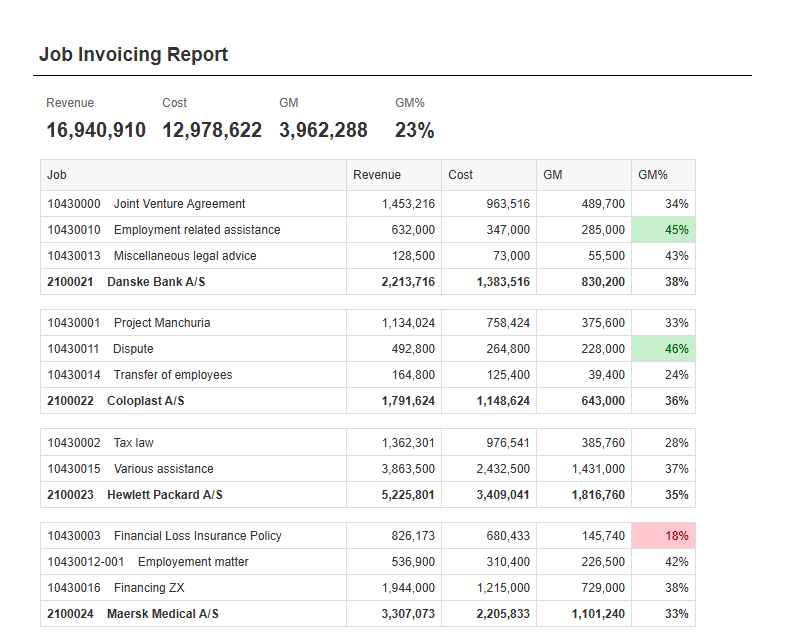
I’ve created Job Invoicing Report on the Job Invoicing universe, using Sales Report as the template. It’s saved and I checked it from a fresh session.
OpenDocument URL:
http://win-v6vl2j82t3u:8080/BOE/OpenDocument/opendoc/openDocument.jsp?sIDType=CUID&iDocID=ATk4R.9xxDREiaNiPvPkHSo
How the template was mapped
| Sales Report | Job Invoicing Report |
|---|---|
| Product line (one block per line, with a subtotal) | Customer (number and name) |
| Category (table rows) | Job (number and name) |
| Sales revenue | Revenue = registered billing price, enterprise currency |
| Margin | GM = the universe’s registered gross margin (billing minus cost), enterprise currency |
| Cost = Revenue − Margin | Cost = Revenue − GM, which equals the registered cost price |
| Year: prompt | Year: prompt on the year of the entry date |
Everything else carries over unchanged:
- The four KPI tiles: Revenue, Cost, GM, GM%.
- The GM% column, with subtotals and the grand total showing the GM% of their own totals.
- Red below 20% and green above 45%.
- The repeating header, refresh on open, and saving without data.
I renamed the tab and title to “Job Invoicing” / “Job Invoicing Report”. Amounts are now shown as plain numbers without the $ sign, because the figures are in the enterprise currency.
Assumptions I made
- Registered rather than invoiced figures. I first built it on invoiced billing and margin, but nothing has been invoiced in this system, so revenue was 0 in every year. Registered billing gives a working profitability view by customer and job, and it matches what the universe itself calls GM.
- Enterprise currency, so totals across companies can be added together. Company-currency figures would mix currencies.
- One year, picked by entry date, like the template. Data exists only for 2024 and 2025.
Data check (Year 2024, not saved)
- Revenue 16,940,910, Cost 12,978,622, GM 3,962,288, GM% 23%.
- There are five customers (Danske Bank, Coloplast, Hewlett Packard, Maersk Medical, LEGO), with GM% between 33% and 40%.
- “Financial Loss Insurance Policy” (18%) shows red, and “Liquidation” (56%) and “Dispute” (46%) show green.
- The customer revenues add up to the total, and the GM per customer adds up to the total GM.
Documents (demo system, Public Folders › Demo)
- Job Invoicing Report, id 29675: new and saved.
- Sales Report, id 28938: used only as the template and not changed.
Open points
- The internal customer “99990 Trifolium Law Internal” (internal matters, absence, overtime, yearly adjustments) has costs of 2,173,200 and no revenue. That pulls the overall GM% down from about 36% to 23%. I can exclude internal jobs, or show them in a separate block, if you prefer.
- If you’d rather report what was actually invoiced, the report can switch back to invoiced figures in a few minutes. It will only show useful numbers once invoices exist in the system.
Cost
Each task is charged in usage credits, and one credit costs €1. These are the actual costs of the three tasks in this demo:
| Task | Credits |
|---|---|
| Describe a report | 4 |
| Fix the issues and add KPIs | 21 |
| Build a new report from an existing one | 17 |
| Whole thread | 42 |

